Your CEO wants the website live in two weeks. Your developer says three months. Your budget spreadsheet says „it depends.”
Who’s right?
If you’ve ever tried to get a straight answer about WordPress development timelines, you know the frustration. Every quote is different. Every estimate comes with asterisks. Every project seems to take twice as long as promised.
Here’s the reality: A WordPress site can take anywhere from 3 days to 6 months—and both extremes can be correct depending on what you’re building and how you approach it.
In this guide, I’ll show you exactly what determines your timeline, what’s realistic for different project types, and how to launch faster without cutting corners. This comes from 14 years and over 150 WordPress projects at Moonbite—from quick landing pages to complex B2B portals.
No vague „it depends” answers. Just real timelines, proven processes, and actionable advice.
Let’s start with what actually matters.
The Truth About WordPress Development Timelines
It Depends on These 5 Key Factors
Not all WordPress sites are created equal. A simple blog and a custom eCommerce portal both run on WordPress, but their timelines differ by months. Here’s what actually determines how long your project will take:
1. Project Complexity: What Are You Building?
This is the biggest factor. Let’s be specific:
- Simple blog or portfolio: 3-7 days
- Business website (10-20 pages, contact forms, basic features): 2-4 weeks
- eCommerce site (WooCommerce with 50-200 products): 6-8 weeks
- Custom B2B portal (user accounts, integrations, advanced features): 8-16 weeks
- Enterprise WordPress (multisite, custom architecture): 3-6 months
The difference isn’t just about page count. It’s about functionality depth. A 10-page site with custom user dashboards takes longer than a 50-page brochure site.
2. Design Approach: Template or Custom?
Your design choice dramatically impacts timeline:
- Pre-made theme with tweaks: 2-5 days (fastest option)
- Premium theme customization: 5-10 days
- Custom design from scratch: 2-4 weeks (design phase alone)
- Full design system with UX research: 4-8 weeks
Using a proven theme isn’t „cheating”—it’s efficient. Many successful businesses launch with customized premium themes, then redesign once they’ve validated their market.
At Moonbite, we help clients choose the right approach based on budget, timeline, and business goals. Sometimes custom design is essential. Sometimes it’s premature optimization.
3. Content Readiness: Do You Have Your Assets?
This one kills more timelines than anything else.
If you have content ready (copy, images, videos, product descriptions), you save 1-3 weeks minimum. If you need to create content during development, add 2-4 weeks—or more if you’re writing from scratch.
Content migration from an existing site takes 3-7 days depending on complexity. But if your content is scattered across Word docs, old emails, and „we’ll figure it out later,” expect delays.
Real example: A client came to us with „90% of content ready.” In reality, they had headlines and placeholder text. Content creation added 5 weeks to a project scoped for 3 weeks.
4. Decision Speed: How Fast Can You Give Feedback?
Every approval round adds time:
- Same-day feedback: Project stays on track
- 2-3 day feedback: Adds 1 week per phase
- Week-long delays: Doubles timeline
We’ve seen 4-week projects stretch to 12 weeks purely because of slow feedback loops. It’s not about being demanding—it’s about respecting everyone’s time by responding promptly.
Best practice: Assign one decision-maker. Committee reviews sound democratic but kill momentum.
5. Integrations and Custom Features
Standard WordPress plugins are quick. Custom development is not.
- Standard plugins (contact forms, SEO, caching): 1-2 days
- Payment gateway integration (Stripe, PayPal): 2-5 days
- CRM integration (HubSpot, Salesforce): 1-2 weeks
- ERP/PIM integration: 2-4 weeks
- Custom API development: 3-8 weeks
- Third-party system connections: Depends on documentation quality
Before adding „wouldn’t it be cool if…” features, ask: Does this help launch, or can it come in version 2?
WordPress Timeline by Project Complexity
Let’s get specific. Here’s what you can realistically build in different timeframes:
Simple Site (5-10 Pages) — 3-7 Days
What You Get:
- Home page, about, services, contact, blog
- Pre-made theme customization
- Basic SEO setup
- Contact forms
- Mobile responsive
Timeline Breakdown:
- Day 1: Setup, hosting, theme installation
- Days 2-3: Page creation, content integration
- Days 4-5: Design customization, branding
- Day 6: Testing, final adjustments
- Day 7: Launch
Best For:
- Startups needing quick online presence
- Landing pages for campaigns
- Personal portfolios
- Service businesses with simple offerings
Cost Range: $2,000-$5,000
Moonbite Note: Even on fast projects, we run a light version of Business Core 360 to ensure the site supports your actual business goals, not just „looks nice.”
Business Website (15-30 Pages) — 2-4 Weeks
What You Get:
- Full service/product pages
- About section with team bios
- Case studies or portfolio
- Blog with multiple categories
- Advanced forms (multi-step, conditional)
- Basic analytics and tracking
- Newsletter integration
Timeline Breakdown:
Week 1: Discovery and Planning
- Strategy workshop (business goals, audience, competitors)
- Sitemap creation
- Wireframes for key pages
- Content structure planning
Week 2: Design
- Homepage design concepts (2 options)
- Key page templates (service, product, blog)
- Design system (colors, typography, components)
- First feedback round
Week 3: Development
- Theme setup and customization
- Page building
- Functionality implementation
- Responsive coding
Week 4: Polish and Launch
- Content integration
- SEO optimization
- Cross-browser testing
- Training session
- Launch
Best For:
- Established businesses redesigning
- B2B service companies
- Professional services (agencies, consultants)
- Companies needing strong content marketing foundation
Cost Range: $5,000-$15,000
eCommerce Site (WooCommerce) — 6-8 Weeks
What You Get:
- WooCommerce setup with payment gateways
- Product catalog (50-200 products)
- Shopping cart and checkout optimization
- Shipping configuration
- Email automation (order confirmations, abandoned cart)
- Inventory management
- Customer accounts
- Product filtering and search
Timeline Breakdown:
Weeks 1-2: Strategy and Architecture
- Product strategy workshop
- User journey mapping
- Checkout flow optimization
- Payment and shipping setup planning
- Product categorization structure
Weeks 3-4: Design
- Homepage with featured products
- Product listing page design
- Product detail page template
- Cart and checkout design
- Mobile optimization (critical for eCommerce)
Weeks 5-6: Development
- WooCommerce configuration
- Product upload and organization
- Payment gateway integration
- Shipping calculations setup
- Email template customization
Weeks 7-8: Testing and Launch
- Transaction testing (test orders)
- Security audit
- Performance optimization (speed critical for conversions)
- Final QA
- Launch
Best For:
- Online stores
- B2C businesses moving online
- B2B companies with product catalogs
- Existing stores migrating to WordPress
Cost Range: $10,000-$30,000
Critical Success Factor: eCommerce sites need more testing than any other type. Every broken checkout flow is lost revenue.
Custom Solution (Portals, Platforms) — 8-16 Weeks
What You Get:
- Custom user roles and permissions
- Member/client dashboards
- Advanced forms and workflows
- CRM/ERP integration
- Custom post types and data structures
- Advanced search and filtering
- API connections
- Automated processes
Timeline Breakdown:
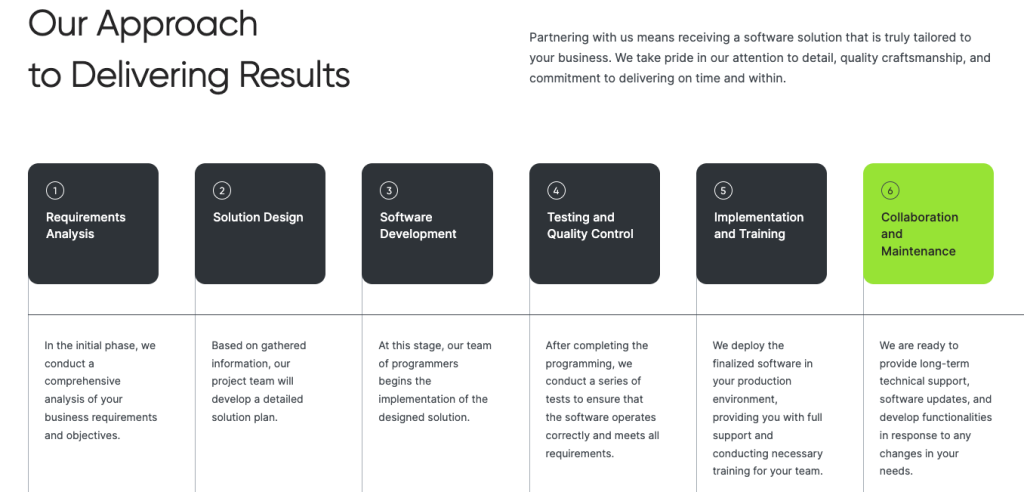
Phase 1: Discovery (Weeks 1-2)
- Deep business process mapping
- User research and personas
- Technical requirements documentation
- System architecture planning
- Integration documentation review
At Moonbite, this is where Product Intelligence 360 shines—we map not just what you want to build, but what your users actually need and what creates business value.
Phase 2: Design and UX (Weeks 3-5)
- User flow diagrams
- Wireframes for all user journeys
- Interactive prototypes
- Visual design
- Design system creation
Phase 3: Development (Weeks 6-12)
- Custom functionality development
- Database architecture
- API integrations
- User dashboard development
- Automated workflow setup
- Admin panel customization
Phase 4: Testing and Launch (Weeks 13-16)
- Functional testing
- User acceptance testing (UAT)
- Security audit
- Performance optimization
- Data migration (if applicable)
- Training and documentation
- Staged rollout
Best For:
- B2B platforms
- Membership sites
- Online learning platforms
- Distribution portals
- Custom business tools
Cost Range: $20,000-$100,000+
Real Example: We built a B2B distribution portal in 14 weeks (competitor quoted 6 months). The client needed supplier/buyer matching, automated order routing, and ERP integration. We delivered on time because we spent 3 weeks in discovery getting requirements crystal clear.
Can You Really Build a WordPress Site in 2 Weeks?
Yes. But only if you understand what’s possible and what’s not in that timeframe.
Yes—If You Do These 5 Things Right
1. Start with Crystal-Clear Scope
The 2-week timeline works when everyone agrees on exactly what’s being built. Not „a nice website with good design and all the features we need.” That’s a 6-month project in disguise.
Instead: „A 12-page business website using Theme X, with contact forms, blog, and basic SEO. No custom features.”
Scope creep is the enemy of speed. Every „quick addition” costs days.
2. Use Proven Frameworks and Components
Building from zero is slow. Building from proven components is fast.
At Moonbite, we have component libraries from 14 years of projects—navigation patterns that work, form layouts that convert, page structures that rank. We’re not copying old work; we’re starting from tested foundations.
Think of it like cooking: A chef creating a new recipe from scratch takes hours. A chef using proven techniques and ingredients works faster and more consistently.
3. Have Content Ready Day One
This cannot be emphasized enough. Content delays kill timelines.
Before starting:
- All copy written and approved
- All images collected or shot
- Product descriptions complete
- Team bios ready
- Any videos edited
If you don’t have content, either hire a copywriter before development starts or accept that your timeline just doubled.
4. Make Decisions Fast
Dedicate time to the project. Put reviews on your calendar. Respond within 24 hours.
When we present design options, we need feedback within 2 business days. Not 2 weeks. Otherwise, your 2-week project becomes a 6-week project.
5. Work with an Experienced Team
Experience equals speed. A developer building their 100th WordPress site works 3x faster than someone on their 5th.
They know the common pitfalls. They’ve solved the tricky problems before. They don’t waste time researching basic solutions.
This is why agency timelines often beat freelancer timelines, even though freelancers may cost less per hour.
Time Is Money, But Rushed Is Expensive
So how long does it take to build a WordPress website?
The short answer: 3 days to 6 months, depending on complexity.
The real answer: As long as it takes to do it right for your specific needs.
A rushed 1-week project might cost you months in lost opportunities if it doesn’t work properly. A perfectly polished 6-month project might cost you market opportunity if your competitor launches in 2 months.
The goal isn’t fast or slow. It’s right-sized for your business needs and timeline.
Here’s what we’ve learned from 14 years and 150+ projects:
- Speed comes from clarity – The clearer your scope, the faster you launch
- Strategy prevents waste – Knowing what you need (vs. what you want) saves time
- Experience multiplies speed – Working with people who’ve done this 100 times beats learning as you go
- Perfect is the enemy of launched – Ship with „very good,” improve with real data
At Moonbite, we don’t promise the fastest timelines. We promise realistic timelines that we actually hit. Because missing a deadline is worse than setting a conservative one.
Whether you need a site in 2 weeks or 4 months, the question isn’t „how fast can you build it?” It’s „how do we build the right thing, efficiently, without compromising what matters?”
That’s where Business Core 360 and Product Intelligence 360 come in. We help you figure out what you actually need, not just what you think you want. Then we build it efficiently using proven processes and strategic thinking.
Your Next Step
If you’re planning a WordPress project and want realistic timeline and budget estimates:
📞 Schedule a Free Discovery Session (30 Minutes)
We’ll discuss:
- Your project goals and requirements
- Realistic timeline estimate
- Budget range
- Approach options (fast launch vs. comprehensive build)
- Whether we’re the right fit
No sales pressure. Just honest advice from people who’ve done this 150+ times.
👉 View Our Portfolio – See real projects with real timelines
The right question isn’t „how long will my WordPress site take?”
It’s „who can help me launch the right site, at the right time, without cutting corners that matter?”
Let’s find out if that’s us.